Installing the Eclipse PHP IDE
I recently wanted to try out the Eclipse PHP IDE, the official Eclipse project that is endorsed/backed by Zend (I’m not entirely sure about the nature of their relationship, to be honest). I already had a working Eclipse installation that I had used to try out PHPeclipse for Eclipse (not to be confused with the PHP IDE), so I didn’t want to bother downloading a brand new full package of Eclipse that includes the PHP IDE and all its requirements. So, I set about on a tedious journey to figure out how to install PHP IDE using the Eclipse Update Manager. These are my notes.
NOTE: If you don’t already have a working copy of Eclipse and you want to try out the PHP IDE, then these notes are not for you. Simply download the full package and install it. Everything should work fine out of the box. These notes are for those who have a working installation of Eclipse, want to install PHP IDE via the Update Manager, and are having trouble finding all the download sites for the PHP IDE prerequisites.
Disable PHPeclipse (if needed)
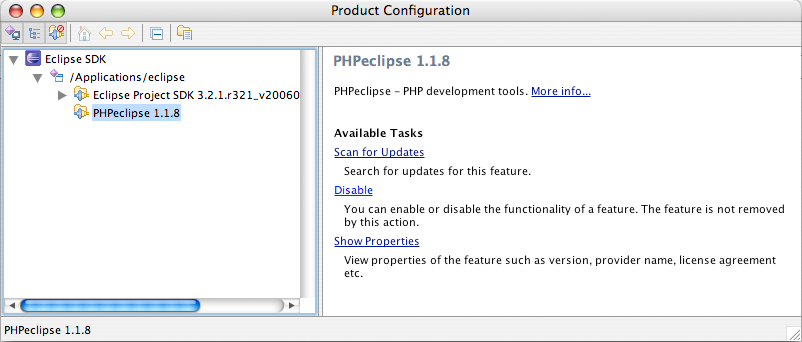
First off, if you have PHPeclipse installed, you’ll need to disable it. Navigate to Help > Software Updates > Manage Configuration. From the tree on the left, find PHPEclipse, highlight it, and choose the “Disable” link from the pane on the right.
Install the PHP IDE Prerequisites
The PHP IDE installation page lists a handful of runtime prerequisites for the PHP IDE plugin. However, it doesn’t list any URLs directing you to where the projects are located or what Update Manager URLs to use. Thus, I’m providing those links here.
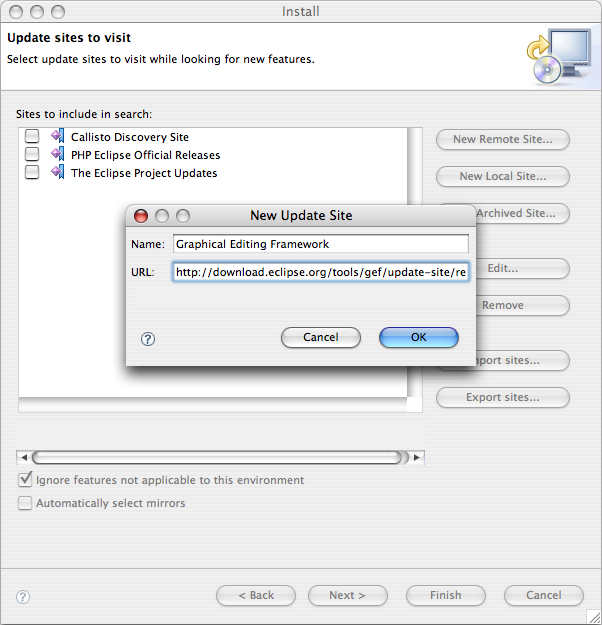
For each of these prerequisites, you must follow these steps to install the package via the Eclipse Update Manager:
- Open the Update Manager at
Help > Software Updates > Find and Install... - Select “Search for new features to install” and click the Next button
- Click the
New Remote Site...button on the right - Enter a name and the update URL for the update site, click
OK - Make sure the checkbox next to the new site is checked and click
Finish - Follow the prompts to install the new package
Now that you know how to install the packages, here are the prerequisites and their update URLs:
-
Graphical Editing Framework (GEF)
UPDATE URL:http://download.eclipse.org/tools/gef/update-site/releases/ -
Eclipse Modeling Framework (EMF)
UPDATE URL:http://download.eclipse.org/tools/emf/updates/ -
Java EMF Model (JEM) – from the Visual Editor Project (VEP)
UPDATE URL:http://download.eclipse.org/tools/ve/updates/1.0/ -
Web Tools Platform (WTP)
UPDATE URL:http://download.eclipse.org/webtools/updates/
Install the PHP IDE Plugin
Now that you have installed all the prerequisites, you are ready to install the PHP IDE plugin, and you shouldn’t encounter any problems now since all the prerequisites are available. To install the PHP IDE plugin, follow the same directions above to set up the PHP IDE update site in the Update Manager using the following update URL:
- PHP IDE
UPDATE URL:http://download.eclipse.org/tools/php/updates/
30 Comments
Well, that's all well and good, but how does it compare to PHPEclipse? I currently use PHPEclipse. I'm typically wary of Zend stuff (blame Stefan Esser?), and lots of other things that are 'commercial' and are messing with a language I use frequently. Also, I'm lazy and would rather you tell me that it sucks than to have to try it and find out it sucks. Luckily, I'm positive I'm not the only lazy person who is wondering the exact same thing, and when several people think like you, your idea/point/plan is validated, right?
What are your thoughts on the plugin now that you've installed it?
Have you ever used the Eclipse plugin from www.xored.com? It's the one I use right now - It can do some pretty useful things for editing code...
* code insight if you annotate functions and classes with javadoc-style comments
* code insight on (most) PHP builtin functions
* but doesn't do code insight on PHP builtin classes like SimpleXML, DOM, Soap, etc
* has a quick key (F3) to navigate to the definition of whatever function name the cursor is currently on
I haven't ever done unit testing or debugging with it, though.
These are just my notes for the installation of PHP IDE for now. I haven't really devoted much time to reviewing it. When I take that time, I'll post my thoughts on it, as well.
mileszs: I really don't get your attitude. Obviously you don't like Zend and what we do (I'm a Zend employee) - but even when we try to give more to the community, you still complain. The PHP IDE project is an *open source* project. We have Zend developers working on it full time. It is actually *cutting down* out Zend Studio sales, and we still do it.
What more can you expect?
Oh, and I don't see how the whole Stefan Esser issue is related to Zend. The guy has some issues with how the PHP project is reacting to his recommendations - this is not a Zend vs. Stefan Esser war.
BTW2: My opinions are mine only, and I am not representing Zend in any official way.
I would have to agree that Zend does alot for PHP. I've had my differences over some Zend products. However, without Zend I'd probably be slingin perl in a virtual coal mine somewhere rather than sitting at a fortune 500 company php'ing fulltime. I definitely applaud them putting out the free IDE.
Now post how to get the damn debugger to work ;)
Shahar: I think you took the one sentence that mentioned Zend a bit far. I am typically wary of Zend stuff because I read Stefan Esser. I don't necessarily buy everything that either camp says... anyway, discussion for another day. I didn't say anything Zend does is bad, and I said NOTHING about your PHP IDE, except that I was curious as to how it compared to what I am currently using. In fact, the mention of Zend is miniscule, and the rest of the sentence goes on to make a silly generalization about commercialization. I think you are the one jumping to conclusions here.
In any case, I suppose I am sorry if you took my statements so negatively, but that was not my intention. I actually could have avoided my own wordiness by simply stating, "Do you have any thoughts on how PHPEclipse compares to PHP IDE?" which was my intended query.
mileszs: I guess I am the one who owes you an apology then ;) I kind of took your words to the wrong direction, and it's good that you don't buy everything from either camp - neither do I.
I could say allot about why I reacted why I did - but this is a discussion for some other time and place - there's no need to get more OT on Ben's blog then I already did.
Good post, I'm using PHPEclipse at work, and Zend's PHP IDE at home and althought I like Zend's soft more (just for the fact it autocompletes engine's predefined constants :)) I was afraid to touch working PHPEclipse installation.
As for the Xored plugin - I used to use it too, but it's development stopped (or at least slowed down a lot) and I was too frustrated by some bugs it has.
One more thing regarding Eclipse plugins: Apatana (http://www.aptana.com/) is great javascript/css/html editor for Eclipse
Ben,
I am not sure many people know anything about the relationship of PHP and Eclipse however I believe Zend is just trying to take part in the Open Souce projects that surround PHP. I heard that Zend has paid developers working on the Eclipse project to furthur advance the IDE.
As to why Zend would pay people to work on a competing IDE to thier Zend Studio i have no idea.
There was also a recent rumor (that i believe to be false) is that Zend is dropping Zend Studio and going to fully promote PHP Eclipse.
Why would Zend do this? They would lose money on the Studio sales they currently get. The only way this could be a good move is if the sales of Zend Studio are falling short of development costs.
What I remember from an interview with Zeev is that Zend Studio shall be based on the Eclipse PHP IDE in the future, with added features, but not based on the current Zend Studio (and I praise that day when this happens, but that's just personal experience :P)
Honestly I think it sucks...after days trying to install it and run the debugger I finally give up. Back to jsp.
Wow, had to find out the hard way where to find the required packages... the Eclipse Updater is in some serious need of updating, perhaps they'd take a note from PEAR?
Joseph , Eclipse is taking off in a big way since it was open sourced by IBM. If you have a look at the official eclipse contributors you will get a idea. This includes Google,HP,IBM,BEA,Borland to name a few. And as with zend, these guys are also paid.
Eclipse is becoming the default developers IDE (be it any programming language :) )
By the way one of the feature I hate in Eclipse is the update feature. It rarely works in a low bandwidth environment. I stick to downloading the plugins and installing it via links mechanism :P
Note that EMF update link didn't work for me. The EMF doc page said to use this url instead:
http://download.eclipse.org...
Then it worked just fine.
Hi Ben,
Thanks for the quick reference. It certainly helped when I got into Eclipse "dependency hell".
Installing the Zend debugger happens simply by adding the Zend PDT site to the update manager and choosing to install it:
http://downloads.zend.com/pdt
Once installed, do the following in Eclipse:
1. Choose Run -> Debug
2. Set your configuratin name, PHP CLI executable and file name (just like in PHPEclipse)
3. Press Debug and you're off! F6 to step over, F5 to step into!
I'm using it now, seems "a little" buggy, but really, I'm quite comfortable with the Zend Studio, and this certainly has alot of the same polish that it does (makes sense, as their working on it, right?).
I should be in Atlanta on March 1st, the 1st Thursday of the month. If so, I'm coming to a meeting!
Thanks again,
Tom Melendez
Long Island PHP Users Group
http://www.liphp.org
Humm,
This don't work any more:
PHP IDE
UPDATE URL: http://download.eclipse.org...
URL has changed to:
PHP IDE
UPDATE URL: http://download.eclipse.org...
Dear Venu, Many thanks for the links. Its really cool. I have the installed truestudio and it seems to be very slow or its the PC.
I have tried phpeclipse but gettting the debugger for my php latest version is difficult. Fedora 6 updates the latest PHP and I cant find the dbug yet for it. Everytime the php editor (Default) never displays the php page and hence can't debug.
I will tryout php eclipse plugin mentioned above and let you guys know the outcome.
Best Regards
The most frustrating thing is that even how hard you try to make debugging works in PDT, it just simply won't no matter how easy Tom Melendez said it is.
I've been trying for days but to no avail. Is there any good tutorial available out there that says how to get PDT to debug let's say a joomla website in a htdoc ?
Any help would be very much appreciated by those encountering problems with PDT like me.
PDT considered harmful!
Why can't it just plain work, first time, every time, out of the box?
Yeah, I know, so many people in the 'Eclipse Community' pride themselves on being such capable hackers, but guess what: in the real world, not everybody has the time to follow the endlessly cyclical links on eclipse.org to try and figure out the basic simple stuff.
This should be a no-brainer:
1) download the 'all in one' zipfile
2) unzip it
3) it just works
BUT NO........
I gotta 'configure' the perspecitves, paths, etc, and the %#@!%@! debugger doesnt work!
This is almost enough to convert me to .NET and Visual Studio.
And I absolutely HATE Microsoft, but at least their stuff works out of the box!
I've mixed a little bit with all those plugins, so I've decided to download eclipse again (3.2.2) and install full all-in-one plugins package - from the link you've give. Unfortunately eclipse still says that to install that PDE you should have all the GEF, EMF, JEM and WTP. Not cool :/ So once again - I'll try step-by-step method.
A short comparison between PHPEclipse and PDT: PHPE is the total pits. No usable code completion: it lists all the names of all the functions in your project. We have a large project, it is OOP, I don't want the bazillion versions of getId() or something to show up on my Company object. More annoying stuff I cannot remember. We evaluated it for a job and it had show stopping missing features. If you can handle that, fine, but why would you?
PDT has good code completion that is very usable although not as smooth as Zend's. If you like Zend, you'll like PDT as well, they're very similar.
If you like programming or do it for a living, steer clear of PHPEclipse.
Hi all !
None of the two URLs given by elkhornbob works... How can I download PHP IDE ???
Thanks in advance !
Sigh, every time I try to install PDT, error occurs, cannot find some file path ... its there though, using Eclipse 3.3, what can be going wrong?
Right now using phpEclipse nightly builds, Eclipse with PHPeclipse is a much smaller install, PDT has so many dependencies.
Updating Eclipse is a huge big pain in the butt! No wonder folks on OS X use TextMate.
To those who want an all in one installer, just found this link, http://europa-mirror1.eclip...
But it still requires components that are not available in the complete package, which is 119Mb (PDT RC4).
Missing components are Java Persistent API, some stuff in Data Tools Platform, some in database development tools, JST, SDO sigh ...
I tried PDT and I found the debugger runs out of the box if you get the all-in-one archive.
A message above asked for differences with PHPEclipse.
One difference is : with PHP Eclipse you cannot debug CLI scripts (for example PHP-GTK applications) because PHP Eclipse listens to port 10000 and the debugger speaks on standard port (7689 or something like that), and this has been changed only in the 1.1.9 version, and this unstable CVS version does not work presently with Eclipse.
With PDT I have hte debugger running fine on my PHP-GTK program.
Well, to be able to debug a PHP-GTK program I had some configuration to do, because "out of the box" PDT uses a PHP without any extension loaded, and if you want to use your PHP version, you must enable the Zend debugger in it. But this is not too difficult.
HI, i try install phpeclipse with you guide, but when install the pre-requisite: "(WTP) this put the error : WST Server Adapters (2.0.1.v200709110637-4-0_kE77Y7TGAoAAJ) requires plug-in "org.mortbay.jetty (5.1.11)", or compatible.
and can't continue with install, need other pre-requisite?.
with GEM, EMF and JEF all ok.
im using linux/ubuntu 7.10 and eclipse 3.2.2 ( install from ubuntu package )
Who can resolve this problem?
tnk, Evaro
I've been using phpeclipse for a few years now, Love it for all of its little problems and sillyness. Before this I'd used dreamweaver ( many years ago ), then nuspheres' PHPEd, alongside PHPEdit ( forget which was the free one, but they looked very similar ) and then finally a mate let me know about phpEclipse.
As for install "Worries" ? google phpeclipse and go to the sourceforge link. download it, extract the folders into your eclipse directory, change the eclipse version parameter in one of its files ( will have to repost the file name, i forget ), and ouala. Done. no online update server hassles, no hair pulling, dang, no cracking a sweat.
Incidentally, the file change is an annoyance, but i guess its there for some reason... not sure what. Eclipse WILL NOT RUN THE PLUGIN without making the change.
Pet peeves : I can't get it to stop completing end brackets or quotes, and the variable completion does indeed seem to load every function known to man. And the PHPbrowser can lead to some duplicate data when trying to test code if you dont kill it.
But.... Its the absolute BEST most FLEXIBLE editor I've EVER seen.
arguements for other software can be met with :
-does it handle java/javascript ?
-can you collapse functions when browsing classes ?
-can you get it for linux, the mans' operating system?
-is it free?
Dave: Just use PDT, it's PHPeclipse, but it actually works.
Arguements:
1. yes
2. yes
3. yes
4. yes
Till now i was using eclipse only for java but i was figuring how do i use this also for php.And i found your blogpost.it really helped me. and thanks again :)